Control the Raspberry Pi 2/3 GPIO pins with Swift 3.0 on Ubuntu 16.04
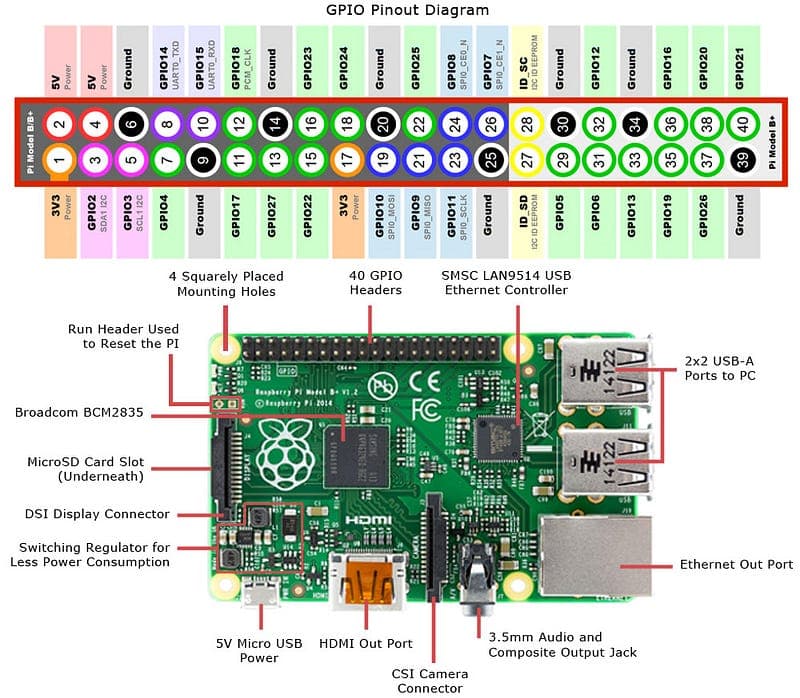
Pin numbers, a breadboard LED on GPIO4, WiringPi to prove the pin responds, and then turning it on and off from Swift 3.0 on Ubuntu 16.04.
Pin numbers, a breadboard LED on GPIO4, WiringPi to prove the pin responds, and then turning it on and off from Swift 3.0 on Ubuntu 16.04.

Fetching the Swift ARM team's daily build and extracting it into a Raspberry Pi running Ubuntu 16.04, ready to drive the GPIO pins from Swift.

Flashing Ubuntu 16.04 server minimal onto a Raspberry Pi 2 or 3 and bringing it up over ssh only, which vanilla Ubuntu will not do on its own.
Reading the GPIO pin numbering, wiring an LED to GPIO4 on a breadboard and switching it on from Swift running on the Raspberry Pi itself.

Installing a Swift 3.0 preview build on a Raspberry Pi 2 or 3 running Raspbian, from apt sources to a first script that talks to the GPIO pins.
Getting Raspbian onto a Raspberry Pi 2 or 3 and configured over ssh alone — no monitor, no keyboard, no mouse — ready for Swift 3.0 afterwards.
The index of the whole series: Raspbian headless with no cables, Swift 3.0 installed, and GPIO pins driving an LED, all over ssh from one machine.

A lamp that runs on a hanging weight instead of fuel, plugs or batteries. What free, unlimited light would mean where the grid does not reach.

Is money spent on space travel worth it? What the other 99% actually got out of it: maps, vacuum cleaners and the internet, among other things.

Almost everything we think we know about addiction is wrong: it is not a chemical hook. Rat parks, bonding and cages tell a different story.